renga
An AI-native terminal for orchestrating multiple Claude Code and Codex agents in one workspace. Mixed-client peer messaging, pane orchestration via MCP, an IME-aware composition overlay for JP/CJK input, and a single Rust binary. Built for developers who already work with 2+ coding agents in parallel.
Use it standalone or under a reference stack. renga works on its own as an AI-native terminal, and it also serves as Layer 3 beneath claude-org, where it becomes the execution fabric for a stricter operating model with Lead / Dispatcher / Curator / Worker roles, per-task directory boundaries, and organization suspend / resume.
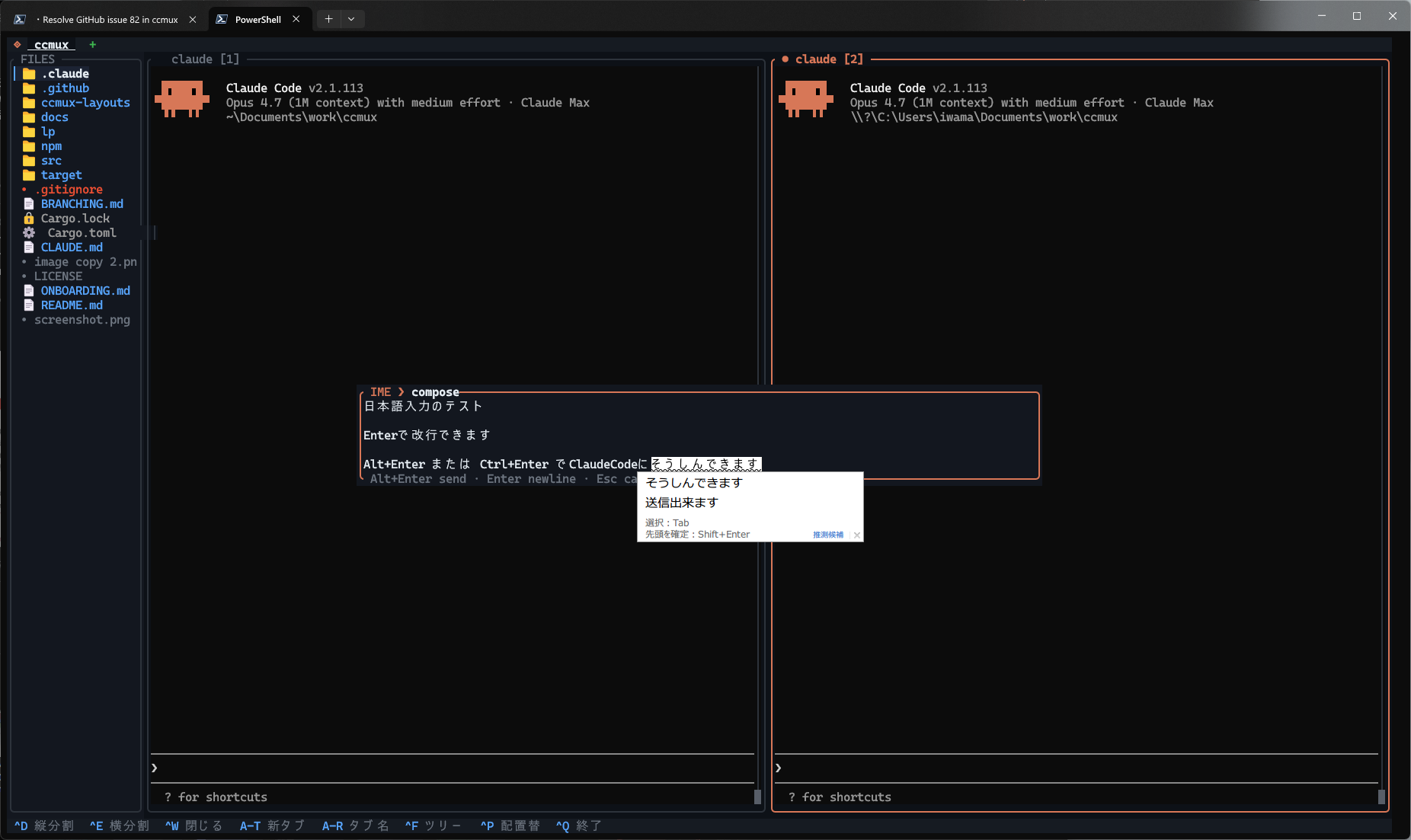
Alt+Enter to send, Enter for a
newline, Esc/Ctrl+C to close
temporarily and reopen the same draft later, and pair with
--ime-freeze-panes to silence background flicker.
renga was originally derived from Shin-sibainu/ccmux and is now developed independently. The AI-agent peer network, mixed-client orchestration flow, IME overlay, layout TOMLs, and bilingual UX layer are all renga-specific work.
The simple way to frame the stack is: renga is the execution fabric; claude-org is the reference operating system built on top of it.
$ npm install -g @suisya-systems/renga
Migrating from previous ccmux-fork:
$ npm uninstall -g ccmux-fork
$ npm install -g @suisya-systems/renga
Migrating from upstream ccmux-cli:
$ npm uninstall -g ccmux-cli
$ npm install -g @suisya-systems/renga
macOS setup: Option as Meta
macOS terminals bind Option+<key> to Unicode
input (å, ∫, π …) by
default, so renga's Alt+T / Alt+P /
Alt+R / Alt+S / Alt+1..9
/ Alt+Left/Right shortcuts never reach the app.
Flip Option to act as a Meta key — a one-line change in every
modern terminal. Plain Terminal.app works too,
but we recommend one of the others for IME, ligatures, and
the image preview panel.
| Terminal | Setting |
|---|---|
WezTerm~/.wezterm.lua |
config.send_composed_key_when_left_alt_is_pressed = false
config.send_composed_key_when_right_alt_is_pressed = false
|
| iTerm2 | Settings → Profiles → Keys → set Left Option key and Right Option key to Esc+ |
Alacritty~/.config/alacritty/alacritty.toml |
[window]option_as_alt = "Both"
(or "OnlyLeft" / "OnlyRight")
|
Ghostty~/.config/ghostty/config |
macos-option-as-alt = true |
Kitty~/.config/kitty/kitty.conf |
macos_option_as_alt yes |
| Terminal.app | Settings → Profiles → Keyboard → tick Use Option as Meta key |
Some macOS IMEs (Kotoeri's Romaji toggle, kana layouts, …)
bind Option themselves — if the Meta setup breaks IME for
you, try the OnlyLeft / OnlyRight
variants so one Option key stays native to the OS.
Alt+1..9 can also collide with macOS Mission
Control / Spaces shortcuts; Alt+Left/Right
still cycles tabs when that happens.
What renga adds beyond its ccmux origin
renga was derived from ccmux and has since evolved
as an independent project. The table below highlights the
renga-specific work — features that originated in this codebase
rather than being inherited from the original ccmux foundation.
renga and ccmux no longer track version-for-version, so columns
reflect each project's current direction rather than a guaranteed
compatibility surface.
| Feature | ccmux | renga |
|---|---|---|
Mixed-client peer messaging between Claude Code and Codex panes in the same tab
renga mcp install --client ... registers the MCP server for Claude Code and Codex. Claude peers receive push-style <channel source="renga-peers"> messages; Codex peers get pane-local nudges and read the queued body with check_messages. The peer scope is the renga tab itself, not a guessed cwd / PID heuristic.
|
— | ✓ |
|
MCP pane control + orchestration from inside agent conversations
The same MCP surface exposes list_panes, spawn_pane, spawn_claude_pane, spawn_codex_pane, close_pane, focus_pane, new_tab, inspect_pane, send_keys, set_pane_identity, and poll_events so an orchestrator agent can grow the team, inspect another pane's screen, answer an interactive prompt, rename workers, and track lifecycle changes without dropping to manual shell glue.
|
— | ✓ |
Centered multi-line IME composition overlay (JP / CN / KR on Windows + third-party terminals)
Alt+Enter to send, Enter for newline,
host IME candidate window anchors to the caret
|
— | ✓ |
Pane freeze + periodic catch-up during IME composition
--ime-freeze-panes suppresses PTY-driven repaints;
--ime-overlay-catchup-ms reintroduces a single
periodic repaint so streaming output stays visible
|
— | ✓ |
Pane lifecycle events (renga events --timeout / --count)
subscribe to PaneStarted / PaneExited as
newline-delimited JSON, with heartbeat-based half-close detection
and stable error codes
|
— | ✓ |
Screen snapshot + layout inspection
renga inspect returns a row-by-row JSON snapshot;
renga list now includes each pane's rect so external
tools can match by on-screen position
|
— | ✓ |
Configurable minimum pane size
--min-pane-width / --min-pane-height
override the 20×5 default so layouts that need tighter
splits no longer have to patch the source
|
— | ✓ |
renga close subcommand
terminate a pane from a script; refuses on the last pane of the last tab so you can't accidentally kill the session |
— | ✓ |
|
Stable IPC error codes
every IPC reply carries a machine-readable code ( PANE_NOT_FOUND, AMBIGUOUS_TARGET, …)
so script callers can branch without string-matching
|
— | ✓ |
Mouse wheel forwarding to alt-screen TUIs (Claude /tui, vim, lazygit) |
— | ✓ |
| CI matrix (Windows / macOS / Linux) with rustfmt + clippy gate | — | ✓ |
Basic IPC (list / send / focus / split / new-tab)
co-developed with upstream PR #4; not yet on upstream master
|
pending | ✓ |